Saturday, June 22, 2019

Configure Multipath in linux

[root@server scsi_host]# iscsiadm -m discovery -t st -p  192.168.150.1
Starting iscsid:                                           [  OK  ]
192.168.150.1:3260,-1 iqn.2008-08.com.starwindsoftware:192.168.150.1-linuxstoragepool
[root@server scsi_host]# iscsiadm -m discovery -t st -p  192.168.150.1,3260
192.168.150.1:3260,-1 iqn.2008-08.com.starwindsoftware:192.168.150.1-linuxstoragepool
[root@server scsi_host]# iscsiadm -m node -L all
Logging in to [iface: default, target: iqn.2008-08.com.starwindsoftware:192.168.150.1-linuxstoragepool, portal: 192.168.150.1,3260] (multiple)
Login to [iface: default, target: iqn.2008-08.com.starwindsoftware:192.168.150.1-linuxstoragepool, portal: 192.168.150.1,3260] successful.

[root@server scsi_host]# multipath -ll
mpatha (2628fb3127e8f77f6) dm-3 ROCKET,IMAGEFILE
size=5.0G features='0' hwhandler='0' wp=rw
`-+- policy='round-robin 0' prio=1 status=active
  `- 3:0:0:0 sde 8:64 active ready running

 
 =================================================================
  Now configure 2nd network path for storage disks.
 =================================================================
[root@server scsi_host]#  iscsiadm -m discovery -t st -p  192.168.159.1
192.168.159.1:3260,-1 iqn.2008-08.com.starwindsoftware:192.168.150.1-linuxstoragepool
192.168.159.1:3260,-1 iqn.2008-08.com.starwindsoftware:192.168.159.1-linuxstoragepool
[root@server scsi_host]#  iscsiadm -m discovery -t st -p  192.168.159.1,3260
192.168.159.1:3260,-1 iqn.2008-08.com.starwindsoftware:192.168.150.1-linuxstoragepool
192.168.159.1:3260,-1 iqn.2008-08.com.starwindsoftware:192.168.159.1-linuxstoragepool


[root@server multipath]#  iscsiadm -m node -L all
Logging in to [iface: default, target: iqn.2008-08.com.starwindsoftware:192.168.159.1-linuxstoragepool, portal: 192.168.159.1,3260] (multiple)
Logging in to [iface: default, target: iqn.2008-08.com.starwindsoftware:192.168.150.1-linuxstoragepool, portal: 192.168.159.1,3260] (multiple)
Login to [iface: default, target: iqn.2008-08.com.starwindsoftware:192.168.159.1-linuxstoragepool, portal: 192.168.159.1,3260] successful.
Login to [iface: default, target: iqn.2008-08.com.starwindsoftware:192.168.150.1-linuxstoragepool, portal: 192.168.159.1,3260] successful.

==============================================================
Now in following output you can see boths disks are showing 2 paths for eachs disk
==============================================================
[root@server multipath]# multipath -ll
mpathb (26eb538fc86227b31) dm-4 ROCKET,IMAGEFILE
size=50G features='0' hwhandler='0' wp=rw
|-+- policy='round-robin 0' prio=1 status=enabled
| `- 3:0:0:1 sdf 8:80  active ready running
`-+- policy='round-robin 0' prio=1 status=active
  `- 5:0:0:1 sdh 8:112 active ready running
mpatha (2628fb3127e8f77f6) dm-3 ROCKET,IMAGEFILE
size=5.0G features='0' hwhandler='0' wp=rw
|-+- policy='round-robin 0' prio=1 status=enabled
| `- 3:0:0:0 sde 8:64  active ready running
`-+- policy='round-robin 0' prio=1 status=active
  `- 5:0:0:0 sdg 8:96  active ready running
[root@server multipath]#
[root@server multipath]#
[root@server multipath]#

====================================================================
Now lets try to disable one path and we should see active faulty running in multipath -ll output
====================================================================
 [root@server ~]# multipath -ll

mpathb (26eb538fc86227b31) dm-4 ROCKET,IMAGEFILE
size=50G features='0' hwhandler='0' wp=rw
|-+- policy='round-robin 0' prio=0 status=enabled
| `- 3:0:0:1 sdf 8:80  active faulty running      <============ See we have one path faulty for  mpathb disk
`-+- policy='round-robin 0' prio=1 status=active
  `- 5:0:0:1 sdh 8:112 active ready running
mpatha (2628fb3127e8f77f6) dm-3 ROCKET,IMAGEFILE
size=5.0G features='0' hwhandler='0' wp=rw
|-+- policy='round-robin 0' prio=0 status=enabled
| `- 3:0:0:0 sde 8:64  active faulty running
`-+- policy='round-robin 0' prio=1 status=active
  `- 5:0:0:0 sdg 8:96  active ready running

 ============================ ===========================
Now enable vmnet virtaul adapter and path should be recover by its own
=========================== ============================  
  [root@server ~]# multipath -ll
mpathb (26eb538fc86227b31) dm-4 ROCKET,IMAGEFILE
size=50G features='0' hwhandler='0' wp=rw
|-+- policy='round-robin 0' prio=1 status=enabled
| `- 3:0:0:1 sdf 8:80  active ready running
`-+- policy='round-robin 0' prio=1 status=active
  `- 5:0:0:1 sdh 8:112 active ready running
mpatha (2628fb3127e8f77f6) dm-3 ROCKET,IMAGEFILE
size=5.0G features='0' hwhandler='0' wp=rw
|-+- policy='round-robin 0' prio=1 status=enabled
| `- 3:0:0:0 sde 8:64  active ready running
`-+- policy='round-robin 0' prio=1 status=active
  `- 5:0:0:0 sdg 8:96  active ready running
Thursday, May 30, 2019

Play book to install multiple packages then restart services using with_items:

Writing a play book to install multiple packages using vars and then restart  services using  with_items:
Starting multiple services using with_items:
You can use the with_items parameter to control multiple services in a single task.
Note: Make sure the {{ item }} is within quotes, and the with_items block need to be intended at the level of module name in our case its -here systemd. The following example will restart nfs-utils and httpd, a daemon reload before it restarts the service.


Now lets try to install httpd and nfs-utils on web client

[root@web1 ~]# yum list nfs-utils httpd
Loaded plugins: fastestmirror, langpacks
Loading mirror speeds from cached hostfile
 * base: mirror.nbrc.ac.in
 * epel: sg.fedora.ipserverone.com
 * extras: mirror.nbrc.ac.in
 * updates: mirror.nbrc.ac.in
Available Packages
httpd.x86_64                                                   2.4.6-89.el7.centos                                               updates
nfs-utils.x86_64                                               1:1.3.0-0.61.el7                                                  base
[root@web1 ~]#


[root@ansimaster playbooks]# cat multipalepacke.yml
# Simple anisble playbook to install multiple packages.
-
 name: Play to install multiple pacakges
 hosts: webservers
 tasks:
  - name: Ensure list of package present on web client
    yum:
      name: "{{Packages}}"
    vars:
      Packages:
      - nfs-utils
      - httpd

  - name: start services for nfs and httpd
    systemd:
      name: "{{ item }}"
      state: restarted
      daemon_reload: yes
    with_items:
      - 'httpd'
      - 'nfs-utils'
[root@ansimaster playbooks]#
[root@ansimaster playbooks]#

[root@ansimaster playbooks]#  ansible-playbook multipalepacke.yml --syntax-check

playbook: multipalepacke.yml
[root@ansimaster playbooks]#
[root@ansimaster playbooks]#  ansible-playbook multipalepacke.yml

PLAY [Play to install multiple pacakges] ***********************************************************************************************

TASK [Gathering Facts] *****************************************************************************************************************
ok: [192.168.159.142]

TASK [Ensure list of package present on web client] ************************************************************************************
changed: [192.168.159.142]

TASK [start services for nfs and httpd] ************************************************************************************************
changed: [192.168.159.142] => (item=httpd)
changed: [192.168.159.142] => (item=nfs-utils)

PLAY RECAP *****************************************************************************************************************************
192.168.159.142            : ok=3    changed=2    unreachable=0    failed=0


==================================================================
Now go to web client and check for packages installed or not
==================================================================

[root@web1 ~]# yum list nfs-utils httpd
Loaded plugins: fastestmirror, langpacks
Loading mirror speeds from cached hostfile
 * base: mirror.nbrc.ac.in
 * epel: sg.fedora.ipserverone.com
 * extras: mirror.nbrc.ac.in
 * updates: mirror.nbrc.ac.in
Installed Packages
httpd.x86_64                                                  2.4.6-89.el7.centos                                               @updates
nfs-utils.x86_64                                              1:1.3.0-0.61.el7                                                  @base
[root@web1 ~]#

============================================================================================================
Cheears packages has been installed on client now lets quickly check for services too......
============================================================================================================
[root@web1 ~]# systemctl status httpd; systemctl status nfs-utils;
● httpd.service - The Apache HTTP Server
   Loaded: loaded (/usr/lib/systemd/system/httpd.service; disabled; vendor preset: disabled)
   Active: active (running) since Thu 2019-05-30 11:15:04 EDT; 2min 55s ago
     Docs: man:httpd(8)
           man:apachectl(8)
 Main PID: 15245 (httpd)
   Status: "Total requests: 0; Current requests/sec: 0; Current traffic:   0 B/sec"
   CGroup: /system.slice/httpd.service
           ├─15245 /usr/sbin/httpd -DFOREGROUND
           ├─15247 /usr/sbin/httpd -DFOREGROUND
           ├─15248 /usr/sbin/httpd -DFOREGROUND
           ├─15249 /usr/sbin/httpd -DFOREGROUND
           ├─15250 /usr/sbin/httpd -DFOREGROUND
           └─15251 /usr/sbin/httpd -DFOREGROUND

May 30 11:15:04 web1 systemd[1]: Starting The Apache HTTP Server...
May 30 11:15:04 web1 systemd[1]: Started The Apache HTTP Server.
May 30 11:15:04 web1 httpd[15245]: AH00558: httpd: Could not reliably determine the server's fully qualified domain name, usi... message
Hint: Some lines were ellipsized, use -l to show in full.
● nfs-utils.service - NFS server and client services
   Loaded: loaded (/usr/lib/systemd/system/nfs-utils.service; static; vendor preset: disabled)
   Active: active (exited) since Thu 2019-05-30 11:15:05 EDT; 2min 54s ago
  Process: 15347 ExecStart=/bin/true (code=exited, status=0/SUCCESS)
 Main PID: 15347 (code=exited, status=0/SUCCESS)
   CGroup: /system.slice/nfs-utils.service

May 30 11:15:04 web1 systemd[1]: Stopping NFS server and client services...
May 30 11:15:04 web1 systemd[1]: Starting NFS server and client services...
May 30 11:15:05 web1 systemd[1]: Started NFS server and client services.
[root@web1 ~]#

=============================================================================
waooo services has been started by its own by ansible master server
=============================================================================


Friday, May 24, 2019

Playbook to install package and start services


==================================================
Playbook to install package and start services
==================================================
[root@ansimaster playbooks]# cat installpackage.yml
#Simple Ansible playbook
-
  name: Play 1
  hosts: webservers
  tasks:
    - name: Install httpd package on webservers
      yum:
         name: httpd
         state: present

    - name: Start web service
      service:
         name: httpd
         state: started
[root@ansimaster playbooks]#
[root@ansimaster playbooks]#
[root@ansimaster playbooks]# ansible-playbook installpackage.yml --syntax-check

playbook: installpackage.yml
[root@ansimaster playbooks]#
[root@ansimaster playbooks]#
[root@ansimaster playbooks]# ansible-playbook installpackage.yml

PLAY [Play 1] **************************************************************************************************************************

TASK [Gathering Facts] *****************************************************************************************************************
ok: [192.168.159.142]

TASK [Install httpd package on webservers] *********************************************************************************************
changed: [192.168.159.142]

TASK [Start web service] ***************************************************************************************************************
changed: [192.168.159.142]

PLAY RECAP *****************************************************************************************************************************
192.168.159.142            : ok=3    changed=2    unreachable=0    failed=0

[root@ansimaster playbooks]#


===================================================
On Clint side httpd status  before running playbook
===================================================

[root@web1 ~]# yum list httpd
Loaded plugins: fastestmirror, langpacks
Loading mirror speeds from cached hostfile
 * base: mirror.nbrc.ac.in
 * epel: sg.fedora.ipserverone.com
 * extras: mirror.nbrc.ac.in
 * updates: mirror.nbrc.ac.in
Available Packages
httpd.x86_64                                                 2.4.6-89.el7.centos                                                 updates
[root@web1 ~]#
[root@web1 ~]#

[root@web1 ~]# systemctl status httpd
Unit httpd.service could not be found.
[root@web1 ~]#


===================================================
On Clint side httpd status after running playbook
===================================================

[root@web1 ~]# yum list httpd
Loaded plugins: fastestmirror, langpacks
Loading mirror speeds from cached hostfile
 * base: mirror.nbrc.ac.in
 * epel: sg.fedora.ipserverone.com
 * extras: mirror.nbrc.ac.in
 * updates: mirror.nbrc.ac.in
Installed Packages
httpd.x86_64                                                2.4.6-89.el7.centos                                                 @updates
[root@web1 ~]#


[root@web1 ~]# systemctl  status httpd
● httpd.service - The Apache HTTP Server
   Loaded: loaded (/usr/lib/systemd/system/httpd.service; disabled; vendor preset: disabled)
   Active: active (running) since Fri 2019-05-24 12:04:32 EDT; 9s ago
     Docs: man:httpd(8)
           man:apachectl(8)
 Main PID: 7994 (httpd)
   Status: "Total requests: 0; Current requests/sec: 0; Current traffic:   0 B/sec"
   CGroup: /system.slice/httpd.service
           ├─7994 /usr/sbin/httpd -DFOREGROUND
           ├─7995 /usr/sbin/httpd -DFOREGROUND
           ├─7996 /usr/sbin/httpd -DFOREGROUND
           ├─7997 /usr/sbin/httpd -DFOREGROUND
           ├─7998 /usr/sbin/httpd -DFOREGROUND
           └─7999 /usr/sbin/httpd -DFOREGROUND

May 24 12:04:32 web1 systemd[1]: Starting The Apache HTTP Server...
May 24 12:04:32 web1 httpd[7994]: AH00558: httpd: Could not reliably determine the server's fully qualified domain name, usin... message
May 24 12:04:32 web1 systemd[1]: Started The Apache HTTP Server.
Hint: Some lines were ellipsized, use -l to show in full.
[root@web1 ~]#

If your server has static ip and its getting change by its own


============================================
If your server has static ip and its getting change by its own 
============================================

 dracut -vf
 dracut -vf /boot/initramfs-3.10.0-514.10.2.el7.x86_64.img
 dracut -f /boot/initramfs-3.10.0-514.10.2.el7.x86_64.img
 grub2-mkconfig -o /boot/grub2/grub.cfg
 init 6

How to Copy file from remote server to local Anisble server

===============================================================
How to Copy file from remote server to local Anisble server
===============================================================

Let`s take backup of ens33 network configuration file on ansible server

Following file is on ansible web client

[root@web1 network-scripts]# cat /etc/sysconfig/network-scripts/ifcfg-ens33
TYPE=Ethernet
BOOTPROTO="static"
NAME=ens33
UUID=0ca5a92f-d841-4f82-a69b-56c6a52657e5
IPADDR="192.168.159.142"
NETMASK="255.255.255.0"
GATEWAY="192.168.159.2"
DEVICE=ens33
ONBOOT=yes
[root@web1 network-scripts]#

====================================================================================================
Now lets write playbook which will copy file from web1 ansible client to ansible server localy
====================================================================================================
[root@ansimaster playbooks]# cat fetchremotefile.yml
- hosts: webservers
  tasks:
  - name: Ansible fetch files from remote server to the local machine under /tmp/web1/ using Ansible fetch module
    fetch:
       src: /etc/sysconfig/network-scripts/ifcfg-ens33
       dest: /tmp/web1/
[root@ansimaster playbooks]#
[root@ansimaster playbooks]#
[root@ansimaster playbooks]# ansible-playbook -v fetchremotefile.yml --syntax-check
Using /etc/ansible/ansible.cfg as config file
/etc/ansible/hosts did not meet host_list requirements, check plugin documentation if this is unexpected
/etc/ansible/hosts did not meet script requirements, check plugin documentation if this is unexpected

playbook: fetchremotefile.yml
[root@ansimaster playbooks]#
[root@ansimaster playbooks]# ansible-playbook -v fetchremotefile.yml
Using /etc/ansible/ansible.cfg as config file
/etc/ansible/hosts did not meet host_list requirements, check plugin documentation if this is unexpected
/etc/ansible/hosts did not meet script requirements, check plugin documentation if this is unexpected

PLAY [webservers] **********************************************************************************************************************

TASK [Gathering Facts] *****************************************************************************************************************
ok: [192.168.159.142]

TASK [Ansible fetch files from remote server to the local machine under /tmp/web1/ using Ansible fetch module] **********************
ok: [192.168.159.142] => {"changed": false, "checksum": "9fdc4631156b259899e953b5f404210da39ca1cb", "dest": "/tmp/web1/192.168.159.142/etc/sysconfig/network-scripts/ifcfg-ens33", "file": "/etc/sysconfig/network-scripts/ifcfg-ens33", "md5sum": "1d434556162da86401f9945f74fd4929"}

PLAY RECAP *****************************************************************************************************************************
192.168.159.142            : ok=2    changed=0    unreachable=0    failed=0

[root@ansimaster playbooks]#


=====================================================================================================================
Now check network configuration file of web1 client should preset on ansible server under /tmp/web1/
=====================================================================================================================
[root@ansimaster ~]# ls -ld /tmp/web1
drwxr-xr-x. 3 root root 29 May 22 09:25 /tmp/web1
[root@ansimaster ~]#

[root@ansimaster network-scripts]# cat /tmp/web1/192.168.159.142/etc/sysconfig/network-scripts/ifcfg-ens33
TYPE=Ethernet
BOOTPROTO="static"
NAME=ens33
UUID=0ca5a92f-d841-4f82-a69b-56c6a52657e5
IPADDR="192.168.159.142"
NETMASK="255.255.255.0"
GATEWAY="192.168.159.2"
DEVICE=ens33
ONBOOT=yes
[root@ansimaster network-scripts]#

Saturday, May 4, 2019

Managing config from ansible server to client and then do conditional restart of service


[root@ansimaster conf]# cat /root/apache_playbook2.yml
---
- hosts: webservers
  become: true
  become_user: root
  tasks:
  - name: Install httpa package
    yum: name=httpd state=present
  - name: Start appache services
    service: name=httpd state=started
  - name: Deploying httpd conf
    copy: src=/ansible/config/httpd/conf/ dest=/usr/share/httpd/noindex/
    notify: restart httpd
  handlers:
  - name: restart httpd
    service: name=httpd state=restarted


#notify module executed only if file get copied to target host only and then restart httpd

[root@ansimaster conf]#

[root@ansimaster conf]# diff index.html index.html.bkp
68c68
<         <h1> Welcome mylinuxfriends 123..</h1>  <=========== we have added new contents in config.
---
>         <h1> Testing 123..</h1>
[root@ansimaster conf]#

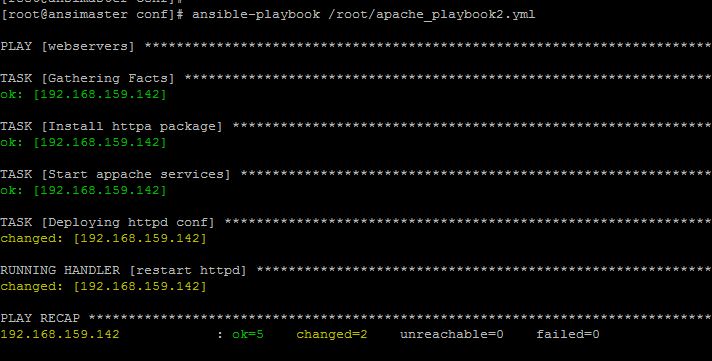
[root@ansimaster conf]# ansible-playbook /root/apache_playbook2.yml <======== run your playbook


**** Now go to your client and check new content should be copied to target nodes and httpd should be running ****

[root@web1 images]# grep -i welcome /usr/share/httpd/noindex/index.html
          <h1> Welcome mylinuxfriends 123..</h1>
                                        <p>To prevent this page from ever being used, follow the instructions in the file <tt>/etc/httpd/conf.d/welcome.conf</tt>.</p>
[root@web1 images]#
[root@web1 images]# systemctl status httpd
● httpd.service - The Apache HTTP Server
   Loaded: loaded (/usr/lib/systemd/system/httpd.service; disabled; vendor preset: disabled)
   Active: active (running) since Sat 2019-05-04 12:31:30 EDT; 20min ago
     Docs: man:httpd(8)
           man:apachectl(8)
  Process: 23862 ExecStop=/bin/kill -WINCH ${MAINPID} (code=exited, status=0/SUCCESS)
 Main PID: 23866 (httpd)
   Status: "Total requests: 5; Current requests/sec: 0; Current traffic:   0 B/sec"
   CGroup: /system.slice/httpd.service
           ├─23866 /usr/sbin/httpd -DFOREGROUND
           ├─23868 /usr/sbin/httpd -DFOREGROUND
           ├─23869 /usr/sbin/httpd -DFOREGROUND
           ├─23870 /usr/sbin/httpd -DFOREGROUND
           ├─23871 /usr/sbin/httpd -DFOREGROUND
           ├─23872 /usr/sbin/httpd -DFOREGROUND
           ├─23882 /usr/sbin/httpd -DFOREGROUND
           ├─23883 /usr/sbin/httpd -DFOREGROUND
           └─23884 /usr/sbin/httpd -DFOREGROUND

May 04 12:31:30 web1 systemd[1]: Starting The Apache HTTP Server...
May 04 12:31:30 web1 httpd[23866]: AH00558: httpd: Could not reliably determine the server's fully qualified domain name, usi... message
May 04 12:31:30 web1 systemd[1]: Started The Apache HTTP Server.
Hint: Some lines were ellipsized, use -l to show in full.
[root@web1 images]#

Writing playbook in ansible

Now lets write 1st playbook.
============================

[root@ansimaster ~]# cat apache_playbook.yml
---
- hosts: webservers
  become: true
  become_user: root
  tasks:
  - name: Install httpa package
    yum: name=httpd state=present
  - name: Start appache services
    service: name=httpd state=started
   
[root@ansimaster ~]#

===================================================================
We can check if there is any error in playboot using --sytax-check
===================================================================
[root@ansimaster ~]# ansible-playbook apache_playbook.yml --syntax-check

playbook: apache_playbook.yml
[root@ansimaster ~]#
[root@ansimaster ~]#
[root@ansimaster ~]#
[root@ansimaster ~]#
[root@ansimaster ~]#
[root@ansimaster ~]#
===================================================================
If you want to see on how many hosts this playbook will run
===================================================================
[root@ansimaster ~]# ansible-playbook apache_playbook.yml --list-hosts

playbook: apache_playbook.yml

  play #1 (webservers): webservers      TAGS: []
    pattern: [u'webservers']
    hosts (1):
      192.168.159.142
[root@ansimaster ~]#

===================================================================
Now run your 1st playbook
===================================================================

[root@ansimaster ~]# ansible-playbook apache_playbook.yml

PLAY [webservers] **********************************************************************************************************************

TASK [Gathering Facts] *****************************************************************************************************************
ok: [192.168.159.142]

TASK [Install httpa package] ***********************************************************************************************************
changed: [192.168.159.142]

TASK [Start appache services] **********************************************************************************************************
changed: [192.168.159.142]

PLAY RECAP *****************************************************************************************************************************
192.168.159.142            : ok=3    changed=2    unreachable=0    failed=0

[root@ansimaster ~]#


****  Now go to the client and check httd package should be installed and services should be running *****

[root@web1 ~]# yum list httpd
Loaded plugins: fastestmirror, langpacks
Loading mirror speeds from cached hostfile
 * base: centos.mirrors.estointernet.in
 * epel: repos.del.extreme-ix.org
 * extras: repos.del.extreme-ix.org
 * updates: repos.del.extreme-ix.org
Installed Packages
httpd.x86_64                                                2.4.6-89.el7.centos                                                 @updates
[root@web1 ~]#
[root@web1 ~]# systemctl status httpd
● httpd.service - The Apache HTTP Server
   Loaded: loaded (/usr/lib/systemd/system/httpd.service; disabled; vendor preset: disabled)
   Active: active (running) since Sat 2019-05-04 10:43:22 EDT; 29s ago
     Docs: man:httpd(8)
           man:apachectl(8)
 Main PID: 14664 (httpd)
   Status: "Total requests: 0; Current requests/sec: 0; Current traffic:   0 B/sec"
   CGroup: /system.slice/httpd.service
           ├─14664 /usr/sbin/httpd -DFOREGROUND
           ├─14667 /usr/sbin/httpd -DFOREGROUND
           ├─14668 /usr/sbin/httpd -DFOREGROUND
           ├─14669 /usr/sbin/httpd -DFOREGROUND
           ├─14670 /usr/sbin/httpd -DFOREGROUND
           └─14671 /usr/sbin/httpd -DFOREGROUND

May 04 10:43:21 web1 systemd[1]: Starting The Apache HTTP Server...
May 04 10:43:22 web1 httpd[14664]: AH00558: httpd: Could not reliably determine the server's fully qualified domain name, usi... message
May 04 10:43:22 web1 systemd[1]: Started The Apache HTTP Server.
Hint: Some lines were ellipsized, use -l to show in full.
[root@web1 ~]#

Complete list of  recommended VS Code extensions  for writing and managing  AWS Terraform scripts , including syntax checking, variable supp...